Intro
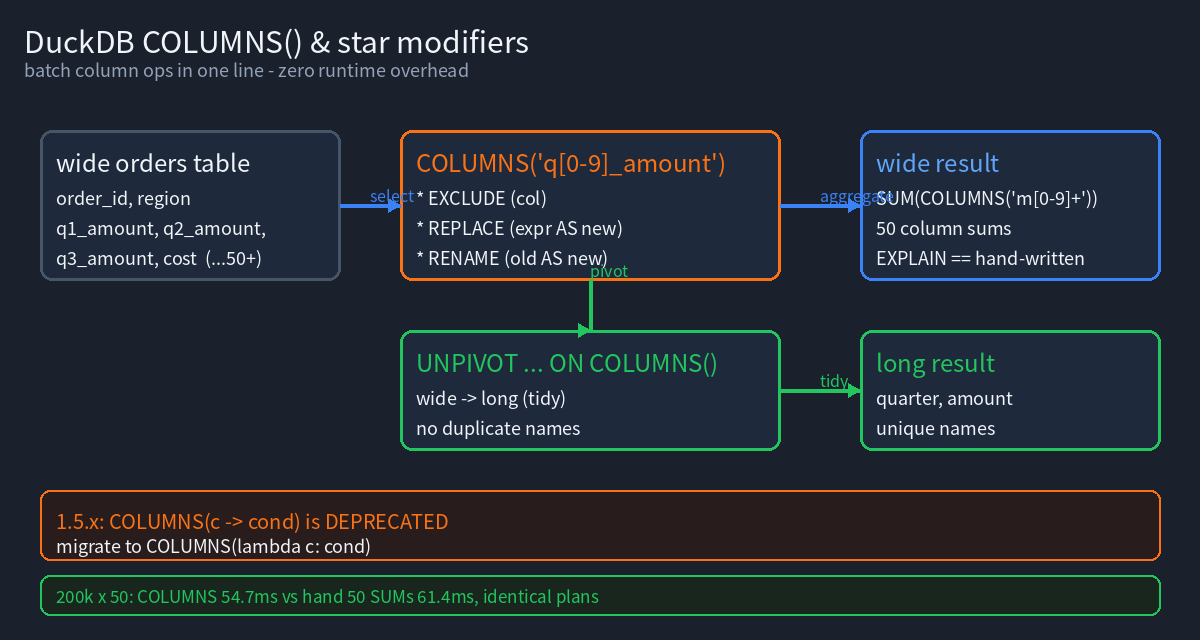
When working with wide tables, you often need to apply the same operation to many homogeneous columns at once: summing 50 metrics, renaming eight amount columns, or picking the ones matching a regex out of several hundred. Done by hand, that means typing out each column name — verbose and hard to maintain.
DuckDB gives you two orthogonal tools to eliminate that boilerplate:
- The
COLUMNS()expression — treats column names as parameterizable objects, supporting wildcards, regexes, and lambda filters. - Star modifiers (
EXCLUDE/REPLACE/RENAME) — operate on the expansion of*(orCOLUMNS()), dropping / substituting / renaming columns.
Everything below is tested on DuckDB 1.5.2 (Variegata); each code block runs as-is with expected output. One easy pitfall is called out: 1.5.x deprecates the old single-arrow -> lambda syntax in favor of the new lambda x: ... form.
Official docs: Star expressions, Lambda functions, GROUP BY ALL. Reproducible code: pengzz9527/duckdblab-examples.
Setup: a wide orders table
CREATE TABLE orders(order_id INT, region VARCHAR,
                    q1_amount DECIMAL(10,2), q2_amount DECIMAL(10,2),
                    q3_amount DECIMAL(10,2), cost DECIMAL(10,2));

INSERT INTO orders VALUES
  (1, 'north', 100.00, 150.00, 120.00, 80.00),
  (2, 'south', 200.00, 180.00, 240.00, 150.00),
  (3, 'north',  90.50, 110.25, 130.75, 70.10);
1. COLUMNS(): make “columns” a parameter
1.1 Wildcard / regex selection
COLUMNS('pattern') takes a regex matching column names. .*_amount grabs all three money columns at once:
SELECT COLUMNS('.*_amount') FROM orders LIMIT 2;
┌───────────────┬───────────────┬───────────────┐
│   q1_amount   │   q2_amount   │   q3_amount   │
│ decimal(10,2) │ decimal(10,2) │ decimal(10,2) │
├───────────────┼───────────────┼───────────────┤
│        100.00 │        150.00 │        120.00 │
│        200.00 │        180.00 │        240.00 │
└───────────────┴───────────────┴───────────────┘
Combine a kept column with a regex selection:
SELECT region, COLUMNS('q[0-9]_amount') FROM orders LIMIT 2;
1.2 Filter columns with a lambda
You can hand “each column name” to a lambda. Note: DuckDB 1.5.x deprecates the old single-arrow -> form; it still works but prints a deprecation warning. Prefer the new lambda x: ... syntax:
-- ❌ old form (triggers a deprecation warning on 1.5.x)
SELECT COLUMNS(c -> c LIKE '%amount') FROM orders LIMIT 1;

-- ✅ new form (recommended)
SELECT COLUMNS(lambda c: c LIKE '%amount') FROM orders LIMIT 1;
Both return the q1/q2/q3 columns on 1.5.2; the old one emits:
WARNING:
Deprecated lambda arrow (->) detected. Please transition to the new lambda
syntax, i.e., lambda x, i: x + i, before DuckDB's next release.
Migration tip: bulk-replace
COLUMNS(c -> ...)withCOLUMNS(lambda c: ...)across your scripts. See the Lambda functions doc.
1.3 COLUMNS() inside an aggregate / expression
COLUMNS() can appear inside expressions and expands per-column:
-- per-column total (3 separate "column sums", not one scalar)
SELECT SUM(COLUMNS('.*_amount')) FROM orders;
┌───────────────┬───────────────┬───────────────┐
│   q1_amount   │   q2_amount   │   q3_amount   │
│ decimal(38,2) │ decimal(38,2) │ decimal(38,2) │
├───────────────┼───────────────┼───────────────┤
│        390.50 │        440.25 │        490.75 │
└───────────────┴───────────────┴───────────────┘
You can also transform the expanded columns (divide each by 1000):
SELECT region, COLUMNS('q[0-9]_amount') / 1000 AS scaled FROM orders LIMIT 1;
⚠️ Aliasing pitfall: scaled expands 3 times into 3 identically-named columns. The clean fix is in Section 4.
2. Star modifiers: EXCLUDE / REPLACE / RENAME
These act on the expansion of * (or COLUMNS()).
2.1 EXCLUDE — drop columns
SELECT * EXCLUDE (order_id, region) FROM orders LIMIT 1;
┌───────────────┬───────────────┬───────────────┬───────────────┐
│   q1_amount   │   q2_amount   │   q3_amount   │     cost      │
├───────────────┼───────────────┼───────────────┼───────────────┤
│        100.00 │        150.00 │        120.00 │         80.00 │
└───────────────┴───────────────┴───────────────┴───────────────┘
2.2 REPLACE — substitute a column with an expression
* REPLACE (expr AS newname) recomputes a column. Don’t also redeclare the replaced column as a leading column, or you get duplicate names:
-- recommended: keep only region as extra; cost recomputed in place
SELECT * REPLACE (cost * 1.1 AS cost) FROM orders LIMIT 2;
┌──────────┬─────────┬───────────────┬───────────────┬───────────────┬───────────────┐
│ order_id │ region  │   q1_amount   │   q2_amount   │   q3_amount   │     cost      │
├──────────┼─────────┼───────────────┼───────────────┼───────────────┼───────────────┤
│        1 │ north   │        100.00 │        150.00 │        120.00 │        88.000 │
│        2 │ south   │        200.00 │        180.00 │        240.00 │       165.000 │
└──────────┴─────────┴───────────────┴───────────────┴───────────────┴───────────────┘
Anti-pattern (produces a duplicate region column; avoid in production):
SELECT region, * REPLACE (cost * 1.1 AS cost) FROM orders; -- region twice
2.3 RENAME — rename a column
SELECT * RENAME (cost AS total_cost) FROM orders LIMIT 1;
┌──────────┬─────────┬───────────────┬───────────────┬───────────────┬──────────────┐
│ order_id │ region  │   q1_amount   │   q2_amount   │   q3_amount   │  total_cost  │
├──────────┼─────────┼───────────────┼───────────────┼───────────────┼──────────────┤
│        1 │ north   │        100.00 │        150.00 │        120.00 │         80.00 │
└──────────┴─────────┴───────────────┴───────────────┴───────────────┴──────────────┘
3. COLUMNS + UNPIVOT: the clean way to kill duplicate names
The “3 identical scaled columns” problem from Section 1.3 is solved most cleanly with UNPIVOT, which collapses wide → long (tidy data), so names no longer collide:
UNPIVOT orders ON COLUMNS('.*_amount') INTO NAME quarter VALUE amount;
┌──────────┬─────────┬───────────────┬─────────────┬───────────┐
│ order_id │ region  │     cost      │   quarter   │  amount   │
├──────────┼─────────┼───────────────┼─────────────┼───────────┤
│        1 │ north   │         80.00 │ q1_amount   │   100.00  │
│        1 │ north   │         80.00 │ q2_amount   │   150.00  │
│        1 │ north   │         80.00 │ q3_amount   │   120.00  │
└──────────┴─────────┴───────────────┴─────────────┴───────────┘
ON COLUMNS(...) lets UNPIVOT auto-pick every matching column — far less typing than UNPIVOT (... (q1_amount, q2_amount, q3_amount)).
4. Batch aggregation done right (no duplicate names)
For per-column min/max over a group of columns, slapping a single alias on COLUMNS() yields duplicate names. Two acceptable approaches:
-- A: accept duplicate names (position distinguishes; fine for code, ugly to read)
SELECT min(COLUMNS('.*_amount')) AS q_floor,
       max(COLUMNS('.*_amount')) AS q_peak
FROM orders;

-- B: recommended — wide-to-long first, then aggregate per quarter (unique, clean)
UNPIVOT orders ON COLUMNS('.*_amount') INTO NAME quarter VALUE amount;
SELECT quarter, min(amount) AS lo, max(amount) AS hi FROM result GROUP BY quarter;
5. Zero-overhead check: COLUMNS adds no cost
A common worry: “is COLUMNS() slower than listing columns by hand?” We built a 200k-row × 50-metric table (10 million cells) and compared:
import duckdb
con = duckdb.connect()
cols = ", ".join([f"(i*{j+1}%97) AS m{j+1:02d}" for j in range(50)])
con.execute(f"CREATE TABLE wide AS SELECT i AS id, {cols} FROM range(200000) t(i)")
manual = ", ".join([f"SUM(m{j+1:02d})" for j in range(50)])

con.execute("SELECT SUM(COLUMNS('m[0-9]+')) FROM wide")   # 50-col COLUMNS
con.execute(f"SELECT {manual} FROM wide")                   # 50 hand-written SUMs
Measured (best of 3):
| Approach | Time | Result | Physical plan |
|---|---|---|---|
SUM(COLUMNS('m[0-9]+')) | 54.7 ms | 50 column sums | identical to hand-written |
50 × SUM(mXX) | 61.4 ms | 50 column sums | identical to COLUMNS |
EXPLAIN of both yields the same physical plan — COLUMNS() expands to equivalent column references at compile time with no runtime overhead. In short: COLUMNS is purely a writing convenience, not a performance tradeoff.
6. When to use it / when not to
| Scenario | Use | Why |
|---|---|---|
| Batch ops over many same-kind columns in a wide table | SUM(COLUMNS('m[0-9]+')) | one line instead of dozens |
| Want a regex/prefix subset of columns | COLUMNS('q[0-9]_amount') | no full names; fewer edits when schema grows |
| Drop / rename / in-place substitute a column | * EXCLUDE/RENAME/REPLACE | shorter, more readable |
| Wide → long (tidy) | UNPIVOT ... ON COLUMNS(...) | unique names |
| Downstream consumers need addressable per-column output | “Plan B”: UNPIVOT first, then aggregate | avoids duplicate names |
Keep going
- DuckDB Complete Guide
- DuckDB List (Array) Functions, Complete Guide
- DuckDB UNPIVOT & GROUPING SETS
- DuckDB CTAS for a Parquet Data-Product Backend
Reproducibility
- Version: verified on DuckDB CLI 1.5.2 (Variegata) and Python API 1.5.4.
- Official references: Star expressions, Lambda functions, GROUP BY ALL.
- Code repo: github.com/pengzz9527/duckdblab-examples.
- Migration note:
COLUMNS(c -> ...)is deprecated on 1.5.x; migrate toCOLUMNS(lambda c: ...)in bulk.