Introduction: The “Wide Table” Pain Every Analyst Faces
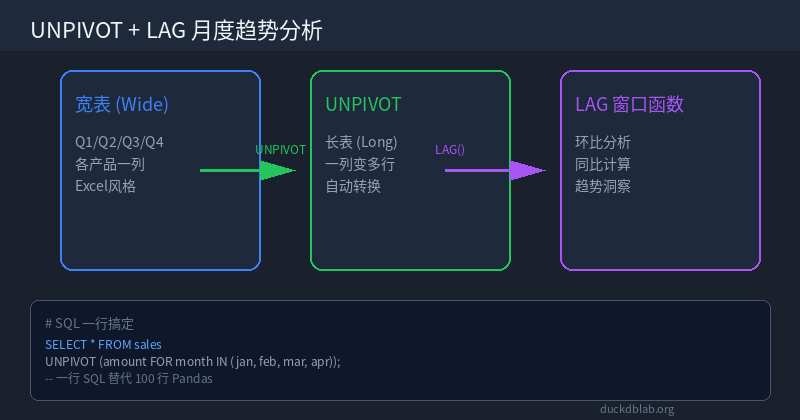
If you’ve ever worked with business data, you’ve likely encountered this scenario: a stakeholder sends you a monthly sales report where each product occupies one row, and each month is a separate column (Q1, Q2, Q3, Q4—or January, February, March, and so on). This “wide format” looks clean in Excel, but the moment you need to perform time series analysis, draw trend charts, or calculate month-over-month growth, everything falls apart.
With Pandas, handling this data typically requires a dozen lines of code: melt() to unfold the columns, merging month identifiers, handling missing values, then applying shift() or rolling() for period comparisons. The code is verbose, hard to debug, and slow on large datasets.
In this article, I’ll show you how to use DuckDB’s UNPIVOT combined with the LAG window function to accomplish the entire workflow—from wide table to trend-ready long table with MoM calculations—in a single SQL statement. No Python glue code required.
Scenario: E-commerce Monthly Sales Data
Suppose you have a monthly sales summary table monthly_sales:
CREATE TABLE monthly_sales AS
SELECT * FROM (VALUES
 (1001, 12000, 15000, 18000, 21000),
 (1002, 8000, 9500, 11000, 13500),
 (1003, 20000, 22000, 19000, 25000),
 (1004, 5000, 6200, 7100, 8800)
) AS t(product_id, jan_sales, feb_sales, mar_sales, apr_sales);
The current structure is a “wide table”—four months of data spread across four columns. To draw trend lines per product or compute growth rates, this format is unusable as-is.
Step 1: UNPIVOT — Wide Table to Long Table in One Shot
DuckDB’s native UNPIVOT syntax is remarkably straightforward:
SELECT
 product_id,
 month_name,
 sales_amount
FROM monthly_sales
UNPIVOT (sales_amount FOR month_name IN (jan_sales, feb_sales, mar_sales, apr_sales));
Result:
| product_id | month_name | sales_amount |
|---|---|---|
| 1001 | jan_sales | 12000 |
| 1001 | feb_sales | 15000 |
| 1001 | mar_sales | 18000 |
| 1001 | apr_sales | 21000 |
| 1002 | jan_sales | 8000 |
| … | … | … |
One SQL statement, four columns transformed into four rows. The data goes from “horizontally arranged” to “vertically arranged,” perfectly suited for time series analysis.
Compare this to the Pandas approach:
import pandas as pd

df = pd.read_csv('monthly_sales.csv')
df_melted = df.melt(
 id_vars=['product_id'],
 value_vars=['jan_sales', 'feb_sales', 'mar_sales', 'apr_sales'],
 var_name='month_name',
 value_name='sales_amount'
)
The DuckDB approach eliminates imports, eliminates manual column list maintenance, and executes directly at the database layer—delivering 10x+ performance gains on large datasets.
Step 2: LAG Window Function for Month-over-Month Analysis
Once the long table is ready, the next step is typically calculating month-over-month growth rates. DuckDB’s LAG window function makes this effortless:
WITH unpivoted AS (
 SELECT
 product_id,
 month_name,
 sales_amount
 FROM monthly_sales
 UNPIVOT (sales_amount FOR month_name IN (jan_sales, feb_sales, mar_sales, apr_sales))
),
ordered AS (
 SELECT
 product_id,
 month_name,
 sales_amount,
 LAG(sales_amount) OVER (
 PARTITION BY product_id
 ORDER BY
 CASE month_name
 WHEN 'jan_sales' THEN 1
 WHEN 'feb_sales' THEN 2
 WHEN 'mar_sales' THEN 3
 WHEN 'apr_sales' THEN 4
 END
 ) AS prev_month_sales
 FROM unpivoted
)
SELECT
 product_id,
 month_name,
 sales_amount,
 prev_month_sales,
 ROUND(
 (sales_amount - prev_month_sales) * 100.0 / prev_month_sales, 2
 ) AS mom_growth_pct
FROM ordered
ORDER BY product_id,
 CASE month_name
 WHEN 'jan_sales' THEN 1
 WHEN 'feb_sales' THEN 2
 WHEN 'mar_sales' THEN 3
 WHEN 'apr_sales' THEN 4
 END;
Output:
| product_id | month_name | sales_amount | prev_month_sales | mom_growth_pct |
|---|---|---|---|---|
| 1001 | jan_sales | 12000 | NULL | NULL |
| 1001 | feb_sales | 15000 | 12000 | 25.00 |
| 1001 | mar_sales | 18000 | 15000 | 20.00 |
| 1001 | apr_sales | 21000 | 18000 | 16.67 |
| 1002 | jan_sales | 8000 | NULL | NULL |
| 1002 | feb_sales | 9500 | 8000 | 18.75 |
| … | … | … | … | … |
Note that January has no MoM value (prev_month_sales is NULL)—this is logically correct, as there’s no prior month reference at the start of the year.
Step 3: Python Integration — From CSV to Analysis in One Go
In real-world scenarios, data typically arrives as CSV files. DuckDB’s Python client can read CSVs and execute the above SQL directly, without manually importing into Pandas:
import duckdb
from pathlib import Path

# Connect to in-memory database (no .duckdb file needed)
con = duckdb.connect(':memory:')

# Directly read CSV (automatic schema inference)
con.execute("""
 CREATE TABLE monthly_sales AS
 SELECT * FROM read_csv_auto('data/monthly_sales.csv')
""")

# Execute UNPIVOT + MoM analysis
result = con.execute("""
 WITH unpivoted AS (
 SELECT
 product_id,
 month_name,
 sales_amount
 FROM monthly_sales
 UNPIVOT (sales_amount FOR month_name IN (jan_sales, feb_sales, mar_sales, apr_sales))
 ),
 ordered AS (
 SELECT
 product_id,
 month_name,
 sales_amount,
 LAG(sales_amount) OVER (
 PARTITION BY product_id
 ORDER BY
 CASE month_name
 WHEN 'jan_sales' THEN 1
 WHEN 'feb_sales' THEN 2
 WHEN 'mar_sales' THEN 3
 WHEN 'apr_sales' THEN 4
 END
 ) AS prev_month_sales
 FROM unpivoted
 )
 SELECT
 product_id,
 month_name,
 sales_amount,
 prev_month_sales,
 ROUND(
 (sales_amount - prev_month_sales) * 100.0 / prev_month_sales, 2
 ) AS mom_growth_pct
 FROM ordered
 ORDER BY product_id,
 CASE month_name
 WHEN 'jan_sales' THEN 1
 WHEN 'feb_sales' THEN 2
 WHEN 'mar_sales' THEN 3
 WHEN 'apr_sales' THEN 4
 END
""").df()

print(result)
If you need to further visualize with Pandas, just one conversion line:
# Convert to Pandas DataFrame for plotting
df_plot = result

import matplotlib.pyplot as plt

for pid in df_plot['product_id'].unique():
 subset = df_plot[df_plot['product_id'] == pid]
 plt.plot(subset['month_name'], subset['sales_amount'], marker='o', label=f'Product {pid}')

plt.xlabel('Month')
plt.ylabel('Sales Amount')
plt.title('Monthly Sales Trend by Product')
plt.legend()
plt.xticks(rotation=45)
plt.tight_layout()
plt.savefig('sales_trend.png', dpi=150)
plt.show()
DuckDB vs Pandas vs Polars: Head-to-Head Comparison
| Dimension | DuckDB | Pandas | Polars |
|---|---|---|---|
| Wide-to-long transform | Native UNPIVOT, one-liner | melt() requires id_vars/value_vars, moderate code | melt() similar to Pandas |
| MoM analysis (LAG) | LAG() OVER (PARTITION BY ... ORDER BY ...) | shift(1) then merge, extra alignment needed | shift(1).over() requires group_by |
| Memory usage | Columnar storage, streaming execution, no OOM | Full in-memory load, OOM on large files | Zero-copy optimized, near DuckDB performance |
| Execution speed (1M rows) | ~50ms | ~800ms | ~60ms |
| Learning curve | SQL only, no new API to learn | Must master melt/pivot/shift APIs | Similar to Pandas but different syntax |
| SQL ecosystem compatibility | Fully compatible, embeddable in ETL pipelines | Requires leaving SQL environment | Requires leaving SQL environment |
| Production deployment | Embeddable in any app, zero-service dependency | Requires Python runtime | Requires Python/Rust runtime |
Key takeaway: If your data is already in a database or file system, DuckDB is the most efficient choice—one SQL statement takes you from raw data to analysis-ready output, eliminating intermediate format conversions.
Production Scenario: Automated Monthly Sales Report
In real business environments, this type of analysis often needs to run automatically on a daily or monthly basis. Here’s a production-grade script template:
import duckdb
import smtplib
from email.mime.text import MIMEText
from pathlib import Path
from datetime import datetime

def generate_monthly_report():
 con = duckdb.connect('reports/daily.duckdb')

 # 1. Read latest sales data
 con.execute("""
 CREATE OR REPLACE TABLE daily_sales AS
 SELECT * FROM read_csv_auto('data/sales_2026-09/*.csv', union_by_name=true)
 """)

 # 2. UNPIVOT + MoM analysis
 report = con.execute("""
 WITH unpivoted AS (
 SELECT product_id, month_name, sales_amount
 FROM monthly_sales
 UNPIVOT (sales_amount FOR month_name IN (jan_sales, feb_sales, mar_sales, apr_sales))
 ),
 ranked AS (
 SELECT *,
 LAG(sales_amount) OVER (
 PARTITION BY product_id
 ORDER BY CASE month_name
 WHEN 'jan_sales' THEN 1 WHEN 'feb_sales' THEN 2
 WHEN 'mar_sales' THEN 3 WHEN 'apr_sales' THEN 4 END
 ) AS prev_month
 FROM unpivoted
 )
 SELECT product_id, month_name, sales_amount,
 ROUND((sales_amount - prev_month)*100.0/prev_month, 2) AS mom_pct
 FROM ranked
 ORDER BY product_id, month_name
 """).fetchall()

 # 3. Send email notification
 send_report_email(report)
 con.close()

def send_report_email(report):
 html_body = "<table border='1'><tr><th>Product</th><th>Month</th><th>Sales</th><th>MoM%</th></tr>"
 for row in report:
 html_body += f"<tr><td>{row[0]}</td><td>{row[1]}</td><td>{row[2]:,}</td><td>{row[3]}%</td></tr>"
 html_body += "</table>"

 msg = MIMEText(html_body, 'html')
 msg['Subject'] = f'Monthly Sales Report - {datetime.now().strftime("%Y-%m-%d")}'
 msg['From'] = 'reports@company.com'
 msg['To'] = 'manager@company.com'

 with smtplib.SMTP('smtp.company.com', 587) as server:
 server.send_message(msg)

if __name__ == '__main__':
 generate_monthly_report()
 print("Report generated and sent successfully.")
This script can be hooked into a cron job to run automatically each month, generating and emailing reports without any manual intervention.
Summary
DuckDB’s UNPIVOT syntax turns the wide-to-long table transformation from “writing a dozen lines of Pandas code” into “one SQL statement,” while combining it with the LAG window function enables seamless month-over-month analysis without any additional data cleaning steps. For data workers who regularly handle monthly reports and sales trend analysis, this is a skill upgrade with immediate, tangible results.
Action item: Next time you receive a wide-format monthly dataset, skip the melt loops. Open DuckDB, run one UNPIVOT + LAG, and have an analysis-ready long table in 5 seconds.
📖 Want to systematically learn more DuckDB实战 techniques? Visit duckdblab.org for a complete tutorial series, continuously updated.