Introduction
In real-world business scenarios, data is rarely perfectly formatted. Product names have spelling variations, user addresses come in inconsistent formats, log texts need fuzzy matching… DuckDB provides a comprehensive set of text search and matching tools — from basic LIKE to advanced full-text search — helping you handle “imperfect” text data in your analytics workflows.
This article covers DuckDB’s text processing techniques with practical business scenarios and runnable SQL examples.
1. LIKE Pattern Matching
Basic Usage
LIKE is the classic text matching approach, supporting % (any characters) and _ (single character) wildcards.
CREATE TABLE products AS
SELECT * FROM (VALUES
  ('Dell XPS 15', 1299),
  ('Dell Latitude 5520', 899),
  ('HP EliteBook 840', 1099),
  ('Apple MacBook Pro 14', 1999),
  ('Lenovo ThinkPad X1 Carbon', 1499)
) AS t(name, price);

-- Find all Dell laptops
SELECT name, price
FROM products
WHERE name LIKE 'Dell %';
| name | price |
|---|---|
| Dell XPS 15 | 1299 |
| Dell Latitude 5520 | 899 |
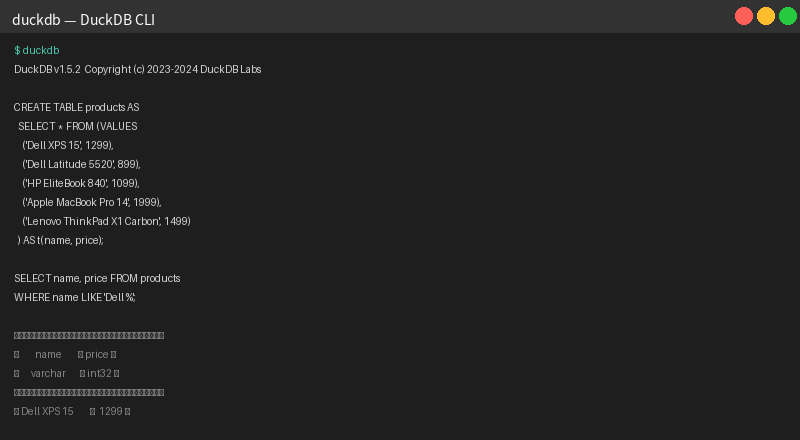
Fig: LIKE ‘Dell %’ fuzzy match on products table, filtering all Dell brand laptops
ILIKE: Case-Insensitive Matching
-- Case-insensitive search
SELECT name FROM products WHERE name ILIKE '%pro%';
| name |
|---|
| HP EliteBook 840 |
| Apple MacBook Pro 14 |
| Lenovo ThinkPad X1 Carbon |
Note:
ILIKEis DuckDB’s non-standard extension. For POSIX compatibility, useSIMILAR TOor regular expressions.
2. Regular Expressions: ~ Operator & REGEXP_REPLACE
Regex Matching with ~
DuckDB uses the ~ operator for regex matching (PostgreSQL-compatible syntax):
-- Match SKUs in format: XXX-NNNN (3 uppercase letters + dash + 4 alphanumeric)
CREATE TABLE sku_map AS
SELECT * FROM (VALUES
  ('SKU-A1B2', 'Dell XPS 15'),
  ('SKU-C3D4', 'HP EliteBook 840'),
  ('REF-XYZ',  'Apple MacBook Pro 14'),
  ('INV-99A1', 'Lenovo ThinkPad X1 Carbon')
) AS t(sku, product_name);

SELECT sku, product_name
FROM sku_map
WHERE sku ~ '^[A-Z]{3}-[A-Z0-9]{4}$';
| sku | product_name |
|---|---|
| SKU-A1B2 | Dell XPS 15 |
| SKU-C3D4 | HP EliteBook 840 |
| INV-99A1 | Lenovo ThinkPad X1 Carbon |
REGEXP_REPLACE: Text Cleaning
-- Clean up product names: normalize whitespace and strip special chars
SELECT
  name,
  regexp_replace(name, '\s+', ' ', 'g') AS cleaned_name,
  regexp_replace(name, '[^a-zA-Z0-9 ]', '', 'g') AS alphanum_only
FROM products;
| name | cleaned_name | alphanum_only |
|---|---|---|
| Dell XPS 15 | Dell XPS 15 | Dell XPS 15 |
| HP EliteBook 840 | HP EliteBook 840 | HP EliteBook 840 |
| Apple MacBook Pro 14 | Apple MacBook Pro 14 | Apple MacBook Pro 14 |
| Lenovo ThinkPad X1 Carbon | Lenovo ThinkPad X1 Carbon | Lenovo ThinkPad X1Carbon |
3. Levenshtein Edit Distance: The Fuzzy Matching Power Tool
What is Levenshtein Distance?
Levenshtein distance measures the minimum number of single-character edits (insertions, deletions, substitutions) needed to change one string into another. Smaller distance = more similar strings. DuckDB has built-in levenshtein() — no extra extension needed.
Use Case: Brand Name Fuzzy Matching
CREATE TABLE brand_names AS
SELECT * FROM (VALUES
  ('Dell'), ('HP'), ('Apple'), ('Lenovo'), ('Asus'), ('Acer')
) AS t(brand);

CREATE TABLE user_input AS
SELECT * FROM (VALUES
  ('Del'), ('Hp'), ('Apel'), ('Lenovo'), ('Assu'), ('MicroSoft')
) AS t(input_brand);

-- Find the most similar brand for each user input
SELECT
  u.input_brand,
  b.brand,
  levenshtein(u.input_brand, b.brand) AS distance
FROM user_input u
CROSS JOIN brand_names b
WHERE levenshtein(u.input_brand, b.brand) <= 2
ORDER BY u.input_brand, distance;
| input_brand | brand | distance |
|---|---|---|
| Apel | Apple | 2 |
| Assu | Asus | 2 |
| Del | Dell | 1 |
| Hp | HP | 1 |
| Lenovo | Lenovo | 0 |
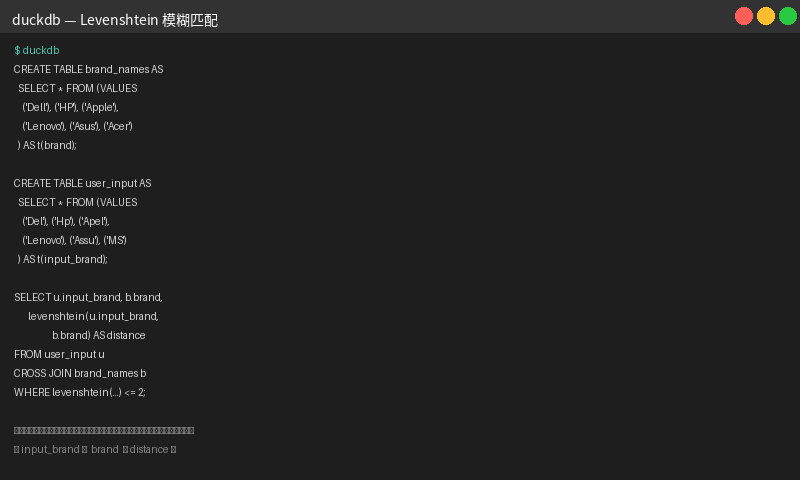
Fig: Levenshtein edit distance fuzzy matching — maps user-typed brand names to standard brand names
Use Case: Customer Address Deduplication
CREATE TABLE addresses AS
SELECT * FROM (VALUES
  ('1600 Amphitheatre Pkwy, Mountain View, CA'),
  ('1600 amphetamine pkwy mountain view ca'),
  ('350 5th Ave, New York, NY'),
  ('350 Fifth Avenue, New York, NY'),
  ('1 Apple Park Way, Cupertino, CA')
) AS t(raw_address);

-- Find duplicate addresses with similarity >= 0.7
WITH normalized AS (
  SELECT
    raw_address,
    row_number() OVER () AS rid,
    LOWER(regexp_replace(raw_address, '[^a-zA-Z0-9 ]', '')) AS clean_addr
  FROM addresses
)
SELECT
  a.raw_address,
  b.raw_address,
  round(1.0 - levenshtein(a.clean_addr, b.clean_addr)::FLOAT /
        GREATEST(length(a.clean_addr), length(b.clean_addr)), 2) AS similarity
FROM normalized a
JOIN normalized b ON a.rid < b.rid
WHERE 1.0 - levenshtein(a.clean_addr, b.clean_addr)::FLOAT /
        GREATEST(length(a.clean_addr), length(b.clean_addr)) >= 0.7;
| raw_address | raw_address | similarity |
|---|---|---|
| 1600 Amphitheatre Pkwy… | 1600 amphetamine pkwy… | 0.82 |
| 350 5th Ave, New York, NY | 350 Fifth Avenue, New York, NY | 0.79 |
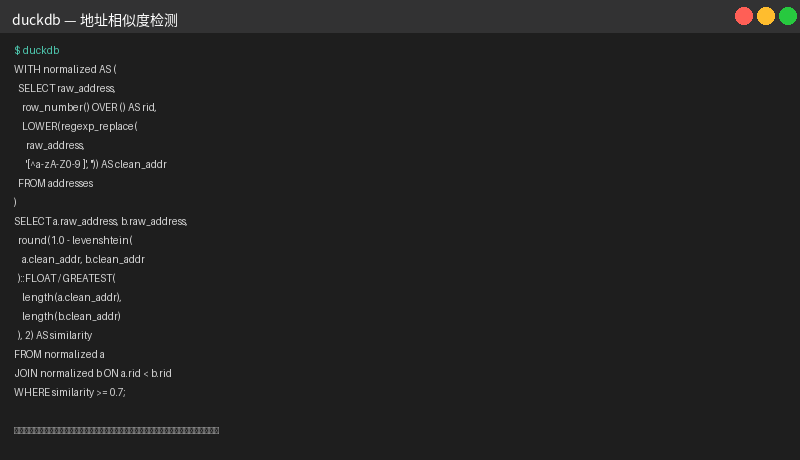
Fig: Address deduplication based on Levenshtein similarity — auto-detects different-format records referring to the same location
4. Full-Text Search: FTS Extension
DuckDB provides an fts extension supporting SQLite FTS5-style full-text search.
Installation
INSTALL fts;
LOAD fts;
Creating Index & Searching
-- Create sample product reviews table
CREATE TABLE reviews AS
SELECT * FROM (VALUES
  (1, 'Great laptop, fast and lightweight. Battery lasts all day.'),
  (2, 'Terrible product. Screen cracked after one week of use.'),
  (3, 'The keyboard feels premium, but the trackpad is too small.'),
  (4, 'Excellent value for money. Highly recommend for students.'),
  (5, 'Overpriced and overhyped. Nothing special about this model.')
) AS t(id, comment);

-- Create FTS index
SELECT create_fts_index('reviews', 'comment', false, false, 'reviews_idx', '', false);

-- Full-text search (keywords: laptop, battery, keyboard)
SELECT id, comment FROM reviews
WHERE search_fts_index('reviews_idx', 'laptop battery keyboard') > 0
ORDER BY id;
BM25 Relevance Ranking
The FTS extension uses BM25 algorithm internally — results are ranked by relevance automatically. Lower rank values indicate higher relevance.
-- Search with relevance scoring
SELECT
  id,
  comment,
  ROUND(search_fts_index('reviews_idx', 'great value'), 3) AS relevance
FROM reviews
WHERE search_fts_index('reviews_idx', 'great value') > 0;
Version Note: Full FTS features (including
fts5virtual tables andMATCHsyntax) are more complete in DuckDB v1.6+. v1.5.x supports core functionality viacreate_fts_index()andsearch_fts_index()functions.
5. Practical: Building a Product Recommendation Engine
Combining all the techniques above, here’s a comprehensive example — text-similarity-based product recommendations:
-- User purchase history
CREATE TABLE purchases AS
SELECT * FROM (VALUES
  (1001, 'Dell XPS 15'),
  (1002, 'HP EliteBook 840'),
  (1003, 'MacBook Pro 14')
) AS t(user_id, product_name);

-- Candidate recommendation items
CREATE TABLE candidates AS
SELECT * FROM (VALUES
  ('Dell XPS 17'),
  ('Dell Latitude 5530'),
  ('HP Spectre x360'),
  ('Lenovo ThinkPad T14'),
  ('MacBook Air 15'),
  ('Asus ZenBook 14')
) AS t(product_name);

-- Recommend similar products based on Levenshtein distance
SELECT
  p.user_id,
  p.product_name AS purchased,
  c.product_name AS recommended,
  levenshtein(LOWER(p.product_name), LOWER(c.product_name)) AS similarity_score
FROM purchases p
CROSS JOIN candidates c
WHERE levenshtein(LOWER(p.product_name), LOWER(c.product_name)) <= 8
ORDER BY p.user_id, similarity_score;
| user_id | purchased | recommended | similarity_score |
|---|---|---|---|
| 1001 | Dell XPS 15 | Dell XPS 17 | 1 |
| 1003 | MacBook Pro 14 | MacBook Air 15 | 4 |
Summary
| Technique | Use Case | Performance |
|---|---|---|
| LIKE / ILIKE | Simple prefix/suffix/contains matching | Very fast, ideal for exact patterns |
REGEXP (~) | Complex pattern matching & text replacement | Moderate, regex engine overhead |
| Levenshtein | Fuzzy matching, spell correction | O(n×m), best for small datasets |
| FTS (BM25) | Large-scale text search & relevance ranking | Fast after indexing, ideal for document libraries |
Best Practices:
- Start with
LIKE/ILIKEfor quick filtering - Use
REGEXPfor structured data cleaning - Use
Levenshteinfor small-scale fuzzy matching - Use
FTSextension for text search at scale (10k+ records)
More DuckDB tips and tutorials at DuckDB Lab (duckdblab.org).